


Managing group study in digital classrooms can be hard sometimes. Many students use social media to help each other with projects. About 70% of students use these platforms for teamwork. Some classmates have fast internet and good devices. Others have trouble joining in. Not everyone feels sure about using the technology. Teachers may need more training, too. In a Group Study Digital Classroom, you need good teamwork. You also need energy and clear goals to use your time well.
Expectations
Setting expectations is the first step to making your Group Study Digital Classroom work well. When you know what to aim for, you feel more confident and ready to join in. Let’s break down how you can set clear goals and group rules that help everyone succeed.
Clear Goals
You need clear goals to guide your group. When everyone knows what to do, you waste less time and get better results. Studies show that writing down your goals makes you 42% more likely to reach them. Teams with clear objectives also understand their tasks better and feel more confident. Over 90% of research on goal setting finds that clear goals boost performance. If you picture your goals, you’ll feel more satisfied and sure about your work.
Here are some tips for setting clear goals:
- Write down what your group wants to achieve.
- Make sure everyone understands the goal.
- Break big tasks into smaller steps.
- Check your progress often.
Group Rules
Rules help your group stay focused and respectful. You can make rules together so everyone feels included. When you talk about rules as a group, you create a safe and predictable space. Research shows that students who help set rules behave better and work together more.
Try these ideas for group rules:
- Keep your camera on if you can.
- Mute your mic when not speaking.
- Listen when others talk.
- Stay on topic and avoid distractions.
- Use kind words and help each other.
You can also remind each other about the rules during your meetings. If someone follows the rules, give them a shout-out! This helps everyone remember what’s expected.
 Group Formation
Getting your group set up the right way makes a big difference in how well you work together. In a Group Study Digital Classroom, you want everyone to feel included and ready to help. Let’s look at how you can build balanced teams and give everyone a clear role.
Balanced Teams
You get better results when your team has a good mix of skills and personalities. If everyone has the same strengths, some tasks might get missed. When you balance your team, you make sure each person brings something special.
- Teams work best when you match people with different abilities and personalities.
- Digital tools can help you form teams by looking at what each person is good at.
- Some platforms use algorithms to match students with complementary skills.
- Studies show that teams with a mix of personality types, like Conscientiousness and Openness, do better on group tasks.
- Even in online communities, people often form teams based on what they can each offer.
Defined Roles
When everyone knows their job, your group runs smoothly. You avoid confusion and make sure no one feels left out. Giving each person a role helps everyone stay on track and take part.
- Common roles include manager, researcher, recorder, and whiteboard writer.
- Each role has its job, so everyone knows what to do.
- Peer evaluations help you see if everyone is doing their part.
- If someone does less than their share, the group score can be adjusted.
- Groups with clear roles have more balanced discussions and better results.
- Switching roles each time keeps things fair and lets everyone try something new.
Note: Assigning roles and rotating them helps everyone learn new skills and keeps your group study sessions interesting.
Group Study Digital Classroom Tools
Digital tools help your Group Study Digital Classroom work better. The right tools make teamwork easier and keep things organized. They can also make learning more fun for everyone. Let’s see how using collaboration platforms and good organization can help your group do well.
Collaboration Platforms
Collaboration platforms let you talk and share ideas online. You can work on projects together even if you are not in the same place. Tools like Google Workspace, Microsoft Teams, and Slack help you chat, share files, and video call your group. These platforms let you ask questions and solve problems as a team.
Research shows digital collaboration tools really help. In one study, 73% of people said they worked better with these tools. Also, 60% said they had more creative ideas. If everyone can join in, your group will work together better. There will be less confusion. These tools help you stay connected and build trust. Trust is very important for group projects.
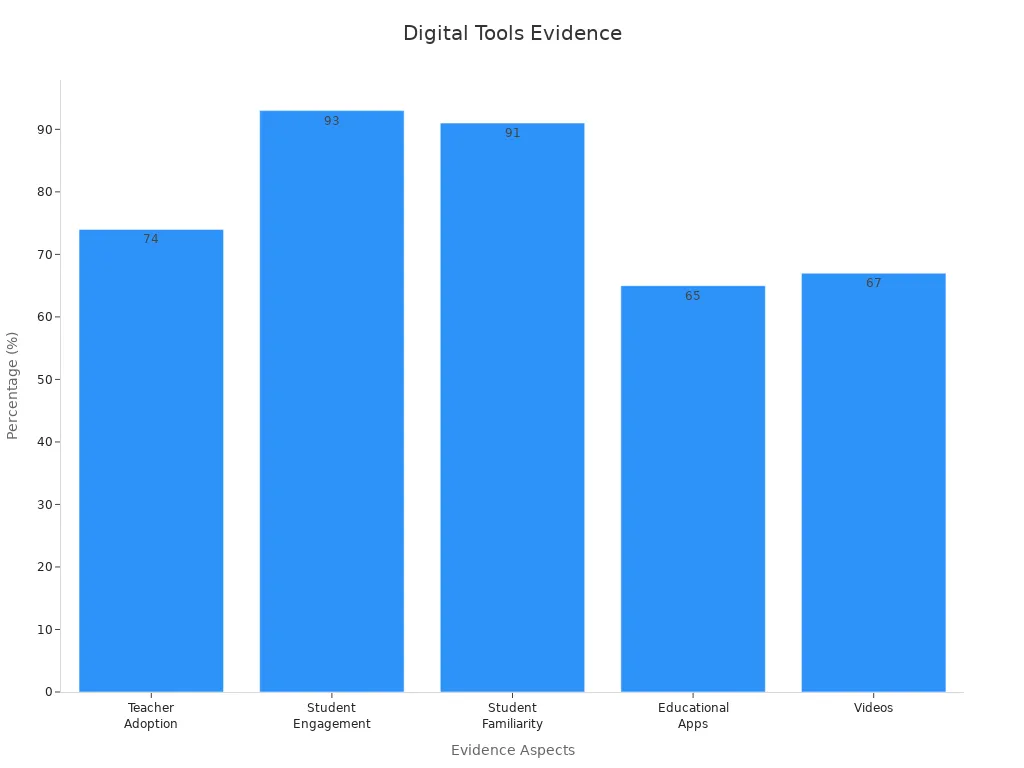
Here is a quick look at how digital tools help in classrooms:
| Evidence Aspect | Supporting Data / Findings |
|---|---|
| Teacher Adoption of Digital Tools | 74% of teachers use digital game-based learning to make lessons better. |
| Student Engagement | 93% of class time is spent on tasks when using game-based learning. |
| Student Familiarity with Digital Games | 91% of school-age children know about video games. |
| Use of Educational Apps & Videos | Educational apps are used 65% and videos 67% of the time in U.S. classrooms. |
| Collaborative Learning Enhancement | Digital tools help students share information and work together well. |
| Role of Teachers | Teachers guide and coach students by using digital tools. |
| Personalized Learning | Software helps students learn in their way and at their speed. |
| Effectiveness Across Education Levels | Interactive learning works for all grades, from K-12 to college. |
| Improved Learning Outcomes | Students using language learning apps scored higher than those who did not use them. |
Organization Methods
Being organized helps your group finish work on time. It also keeps everyone happy. Good organization means you know who does each job and when things are due. You can use digital calendars, to-do lists, and shared folders to keep track of everything.
Studies show that clear organization helps groups do better. Assigning roles, planning together, and managing time are good ways to stay on track. Groups that use these methods finish projects faster. They also feel better about their work. Tools like Google Drive or CODAP let everyone work on the same document. No one gets left out. When you set rules for talking and sharing, your group can solve problems and learn more.
Note: Make a checklist for your next Group Study Digital Classroom project. Check off each step as you finish it to stay on track!
Engagement
When everyone joins in, your group works better. You learn more and feel closer to your classmates. Let’s see how you can get more people to join and have fun in your digital study time.
Active Participation
You help your group when you talk and share ideas. Active participation means you do more than just listen. You ask questions and join group talks. You also help solve problems. Studies show students remember more when they join in. They also do better on tests. A Harvard study found that students learned more by being active. This was true even if they thought listening was easier.
Here are some ways to join in:
- Share your ideas during group chats or calls.
- Ask questions if you do not understand.
- Help others by explaining what you know.
- Take turns leading small parts of the project.
Did you know? Talking about what you learn helps you remember it longer and understand it better.
Being active also makes you feel more sure of yourself. You get better at talking and working with others. This helps you now and later.
Interactive Activities
You can make group study more fun with games or polls. Quick challenges also help. Changing activities keeps everyone interested. Research shows interactive tools like smartboards or iPads help all students join in. This includes students with disabilities. Using different activities keeps your group focused and happy.
Try these ideas to keep things fun:
- Play a quiz game to review what you learned.
- Use a digital whiteboard to share ideas.
- Work in pairs for quick debates or problem-solving.
- Vote on ideas using online polls.
Here are some results from groups that use interactive activities:
| Measurable Result | Description | Percentage/Value |
|---|---|---|
| Team Productivity | Teams focusing on their strengths get more done | 12.5% greater |
| Team Performance | Teams work better together | 30% improvement |
| Retention Improvement | Remembering improves with practice after training | Up to 90% improvement |
| Innovation Likelihood | Strong learning groups try new things more often | 92% more likely |
Communication
Good communication keeps your group running smoothly in a Group Study Digital Classroom. When you talk clearly and check in often, you help everyone stay on track and feel included. Let’s look at how you can use different channels and regular check-ins to boost your group’s success.
Channels
You have many ways to talk with your group online. Some groups use video calls, while others like to chat or send messages. Video calls let you see faces and body language, which helps you understand each other better. Written messages, like emails or group chats, work well for sharing notes or reminders. You need to pick the best channel for your group’s needs.
- Video calls show feelings and help you read the room.
- Group chats are quick for questions or updates.
- Shared documents let everyone add ideas at any time.
A study with college students found that using different platforms, like WhatsApp, Zoom, and Blackboard, made group work easier. Students said that clear and active communication helped them solve problems and make decisions together. When you use channels that everyone knows, you help your group stay connected and work better as a team.
Check-Ins
Regular check-ins keep your group moving forward. You can set up short meetings or send quick messages to see how everyone is doing. These check-ins help you spot problems early and keep everyone focused on the goal.
Weekly check-ins or reflection sessions help you stay on track. They give you a chance to talk about what’s working and what needs to change. When you check in often, you build trust and make sure no one feels left out. This keeps your group motivated and helps you finish your work on time.
Progress
Monitoring
You want your group to move forward and finish strong. Monitoring helps you see how things are going. When you keep track of your group’s work, you spot problems early and fix them before they grow. In a Group Study Digital Classroom, digital tools make this much easier. You can use checklists, shared calendars, or progress bars to see who has done what and what still needs attention.
Research shows that tracking progress helps everyone stay on task. Tools like Google Workspace let you assign tasks, set deadlines, and check off steps as you go. This makes it clear who is doing what. You can see your group’s progress at a glance. Real-time data helps you and your teacher know if you need to change your plan or get extra help. When you see your progress, you feel more motivated to keep going.
Tip: Try setting small goals and checking them off together. Celebrate each win, even the small ones!
Here are some ways monitoring can boost your group’s performance:
- Supportive coaching helps you stick to your plan and build new skills.
- Regular feedback from group members keeps everyone on track.
- Social support and troubleshooting make it easier to solve problems.
- Structured monitoring leads to better teamwork and results.
Support
Support means helping each other when things get tough. Sometimes, someone in your group might fall behind or get stuck. That’s okay! You can offer help, answer questions, or just listen. When you support each other, your group feels stronger and more connected.
You can set up regular check-ins to see how everyone is doing. If someone needs help, talk about it as a group. Maybe you can switch roles or share tips. Teachers can also join your meetings to give advice or answer questions. This kind of support makes everyone feel included and valued.
Note: Don’t be afraid to ask for help. Everyone needs support sometimes, and your group will do better when you work together.
A strong support system helps your group finish projects, learn more, and enjoy your Group Study Digital Classroom experience.
Assessment
Rubrics
Rubrics help you know exactly what your teacher expects. When you use a rubric, you see how your work will be graded before you even start. This makes things feel fair and clear for everyone in your Group Study Digital Classroom. You can check your progress and see where you need to improve. Here are some ways rubrics make group work better:
- Rubrics focus your attention on the most important learning goals.
- You get the same grading as everyone else, so it feels fair.
- You can judge your work by looking at the achievement levels.
- Each part of your project gets its score, so you know what to fix.
- Teachers share rubrics before you start, so you can plan your work.
- Rubrics make grading clear and reduce confusion about grades.
- They help teachers and students talk about what good work looks like.
- If you help make the rubric, you learn how to check your work.
Tip: Ask your teacher to show you the rubric before you begin. This way, you can aim for the best results!
Feedback
Feedback helps you grow and do better next time. When you get feedback quickly, you stay motivated and know what to fix. A study with over 200 students found that waiting more than 10 days for feedback made students lose interest. Fast feedback keeps you engaged and helps you learn more. But it’s not just about speed. The best feedback gives you clear, personal advice you can use right away. Students say they learn more when teachers give detailed comments and support. Good feedback lets you act fast, fix mistakes, and keep moving forward with your group. In a Group Study Digital Classroom, quick and helpful feedback makes your team stronger and helps everyone succeed.
Reflection
Student Input
You have a voice in your Group Study Digital Classroom. When you share your thoughts, your group gets stronger. Your ideas help shape how your team works. You might notice what helps you learn best or what makes things tricky. If you speak up, your group can fix problems faster.
Try these ways to give input:
- Fill out a quick survey after each project.
- Share what you liked or what was hard during a group chat.
- Suggest new tools or activities for next time.
When everyone shares, your group finds better ways to work together. You learn more and feel more included.
Adaptation
Groups that listen and change do better. If your group tries something and it does not work, you can switch things up. Maybe you need to change roles or try a new tool. Adapting helps everyone keep learning and stay motivated.
A recent study looked at how feedback changes group progress. Students who got feedback moved ahead faster in a learning game. They reached higher levels and needed less help from teachers. Most students said they liked getting feedback and wanted more of it.
Here’s what the study found:
| Metric | With Feedback | Without Feedback | Difference |
|---|---|---|---|
| Average game level reached | 5.60 | 4.49 | +1.11 levels |
| Teacher interventions needed | 1.61 | 2.30 | -0.69 interventions |
| Students who liked feedback | 72.64% | N/A | Strong preference |
When your group uses feedback to adapt, you get better results. You also help your teacher spend more time with students who need extra support. In your Group Study Digital Classroom, try to check in often and make small changes based on what your group says. This keeps everyone moving forward and makes learning more fun.
You now have eight essential tips to help your Group Study Digital Classroom succeed. Set clear goals, build balanced teams, use the right tools, and keep everyone engaged. Check in often and support each other. Use rubrics and feedback to improve. Reflect and adapt as you go. Try these strategies, see what works, and keep making your group study even better!