


Choosing the right smart lectern means you match its features and design to your room, event, and tech needs. A smart lectern helps you speak with confidence and keeps your audience interested. Think about your space and what you want from your presentations. > The right choice makes everything smoother and more effective for everyone in the room.
Space & Use
Room Size
First, look at your room before picking a lectern. Small classrooms or meeting rooms need a small lectern. You want one that does not take up much space. It should not block anyone’s view. Tabletop lecterns are good for these rooms. They are light and easy to move. Some have wheels, so you can roll them around.
Big halls or auditoriums need a larger lectern. Full-length lecterns help speakers feel confident. They give space for notes, laptops, and water bottles. In big rooms, built-in microphones and speakers help everyone hear. Even in small rooms, good sound is important if the room echoes.
Here is a quick table showing what people want in different room sizes:
| Venue Size | Most Wanted Features |
|---|---|
| Small Rooms | Compact design, easy to move, antimicrobial surfaces, adjustable height, built-in tablet holders, simple cable management |
| Large Rooms | Durable build, advanced digital connections, big touch screens, AV switching, adjustable height, strong cable management, modular AV racks |
Tip: Always measure your room before you buy. Make sure the lectern fits and people can walk around it.
Audience & Events
Think about who will listen and what events you have. For small groups, a simple lectern works well. For big crowds, you need more features to keep people interested.
- Big groups need built-in sound systems and good microphones.
- Even with small groups, you may want good sound if the room echoes.
- Adjustable height and touchscreens help you reach everyone.
- Tabletop lecterns are good for small meetings. Full-length lecterns stand out at big events.
Events like lectures, business meetings, and training sessions need advanced technology. These lecterns let you switch speakers, record talks, and stream online. They make your presentations look professional and keep people interested.
Smart Lectern Features
Technology
When you look at a smart lectern, the technology inside can make a big difference in your presentations. Most modern smart lecterns come packed with built-in screens, microphones, and speakers. You can find models with integrated computer screens, so you do not need to bring your own device. Some even use patented flipIT® technology, which lets you hide your laptop safely when you do not need it.
You will also see features like:
- Built-in cable management to keep cords neat and out of the way.
- Integrated speakers that give clear sound for everyone in the room.
- LCD screens facing the audience, so they can follow along.
- Power strips and USB ports for easy charging.
- Secure compartments for laptops and other gear.
- Microphone options, like gooseneck or handheld, with easy controls.
- Fold-down side shelves for extra space.
These features help you set up quickly and keep your focus on speaking, not on fixing tech problems. Integrated microphones and speakers in a smart lectern save you time because you do not have to set up extra equipment. They also give you steady, clear sound and lower the risk of feedback. Here’s a quick look at how built-in audio compares to external systems:
| Feature | Integrated Lectern Audio System | External Audio System |
|---|---|---|
| Setup Time | Minimal | Longer |
| Sound Quality | Consistent | Variable |
| Feedback Risk | Low | High |
You get clear sound, less feedback, and more freedom to move around. This makes your presentations smoother and keeps your audience focused.
Smart lecterns have changed a lot in the last few years. Now, you can find models with all-in-one AV systems, built-in computers, and big touch screens. Some even let you control the lights or other devices in the room. These upgrades help you teach, present, or run meetings without any tech headaches.
Adjustability
A good smart lectern should fit you, not the other way around. Adjustable height is one of the best features you can get. With a pneumatic or electric lift, you can raise or lower the lectern with just a touch. This means you can stand tall or sit down and still reach everything you need.
Most adjustable lecterns let you change the height by about 10 inches. This works for people of all sizes, from kids to adults. It also helps if you share the lectern with others, like in a school or office. You can set it just right for each speaker.
You will also find user-friendly controls, like touch screens. These make it easy to switch slides, adjust the volume, or even write notes right on the screen. Touch screens feel natural, like using a phone or tablet. They help you work faster and make fewer mistakes. You can even share your screen wirelessly, so you do not have to mess with cables.
Tip: Adjustable height and touch screens make your smart lectern comfortable and easy to use for everyone.
Accessibility
Everyone should be able to use a smart lectern, no matter their abilities. That is why many models now meet standards like the ADA (Americans with Disabilities Act). You will see features such as:
- Enough space under the lectern for wheelchair users.
- Controls that are easy to reach and simple to use.
- Electronic height adjustment, so you can present sitting or standing.
- Touch screens with high-contrast modes and text-to-speech options.
- Monitor arms that let you move the screen to the best angle.
“Adjustable-height lecterns should be standard (another example of good universal design), and the dais should be accessible to all speakers.”
Some smart lecterns even let you adjust the height from 3 to 6 feet. This means anyone, whether standing or sitting, can use the lectern comfortably. Schools, offices, and event spaces all benefit from these features because they make sure everyone can take part.
When you pick a smart lectern, look for these accessibility features. They help everyone feel included and make your space welcoming for all.
Design & Customization
Style & Materials
You want your lectern to look good and fit your space. The style and material you choose can change the whole feel of your room. Some people like a modern look with aluminum or acrylic. Others prefer the classic feel of wood. You can pick from many finishes and colors to match your venue or event.
Many smart lecterns let you adjust the width, height, and depth. This means you can find one that fits your stage or classroom perfectly. Some models even have glass tops, which help the speaker see the audience better. You can also get features like lockable storage, cable management, and fitted casters for easy moving.
Here are some popular options you might see:
- Aluminum, acrylic, or wood construction
- Adjustable height for comfort and accessibility
- Glass tops for clear views
- Lockable storage for safety
- Built-in holders for tablets or laptops
- Cable management to keep things tidy
Tip: Choose a style and material that matches your space and makes you feel confident when you present.
Branding Options
Branding your lectern helps your message stand out. You can add your logo, school name, or event theme right on the front. This makes your brand easy to see in photos and videos. Many smart lecterns offer options like 3D acrylic logos, vinyl overlays, or magnetic signs. You can even switch out signs for different events, which saves time and money.
Here are some ways you can boost your brand with a smart lectern:
- Add your logo or message with custom signs
- Use colors and fonts that match your brand
- Pick interchangeable signage for quick updates
- Choose finishes that fit your organization’s style
A branded lectern helps people remember your event. It also makes your space look more professional. You can use the same lectern for many events by just changing the sign or logo. This saves you money and keeps your brand strong at every event.
Practical Considerations
Portability
Sometimes you need to move your lectern to other rooms. You might even take it to another building. A portable lectern makes this much easier. Pick a light lectern if you move it a lot. Some lecterns fold flat, so you can store them in small spaces. Wheels or casters let you roll the lectern instead of carrying it. If you work at a school or community center, a portable lectern saves you time and energy.
Tip: Busy presenters should use foldable, light lecterns for fast setups.
Durability
A strong lectern will last a long time and still look nice. The material is very important. Here are some popular choices:
- Aluminum is strong and light. It lasts for years.
- Hardwood, like maple, looks classic and feels sturdy, but it is heavier.
- MDF or melamine is cheaper and does not scratch easily. It is simple to clean.
- Polypropylene is great for schools because it does not dent or scratch.
- Powder-coated steel frames make the lectern steady and protect it from damage.
If you want your lectern to last, choose one made with good materials. Check if you can get new parts if something breaks. Better materials usually mean your lectern will last longer and save you money.
Budget
You can buy a smart lectern no matter your budget. Companies make different models for different needs. Here is a table that shows what you get for each price:
| Price Tier | Price Range | Materials & Build | Key Features & Benefits | Best For |
|---|---|---|---|---|
| Budget | $75-$150 | Steel-MDF, melamine | Basic, foldable, lightweight, easy setup | Occasional users, schools |
| Mid-Range | $150-$500 | MDF, polypropylene, steel | Adjustable height, storage, durable finishes | Regular presenters, training |
| Premium | $500+ | Aluminum, hardwood | Advanced features, customization, long warranties | Professionals, daily users |
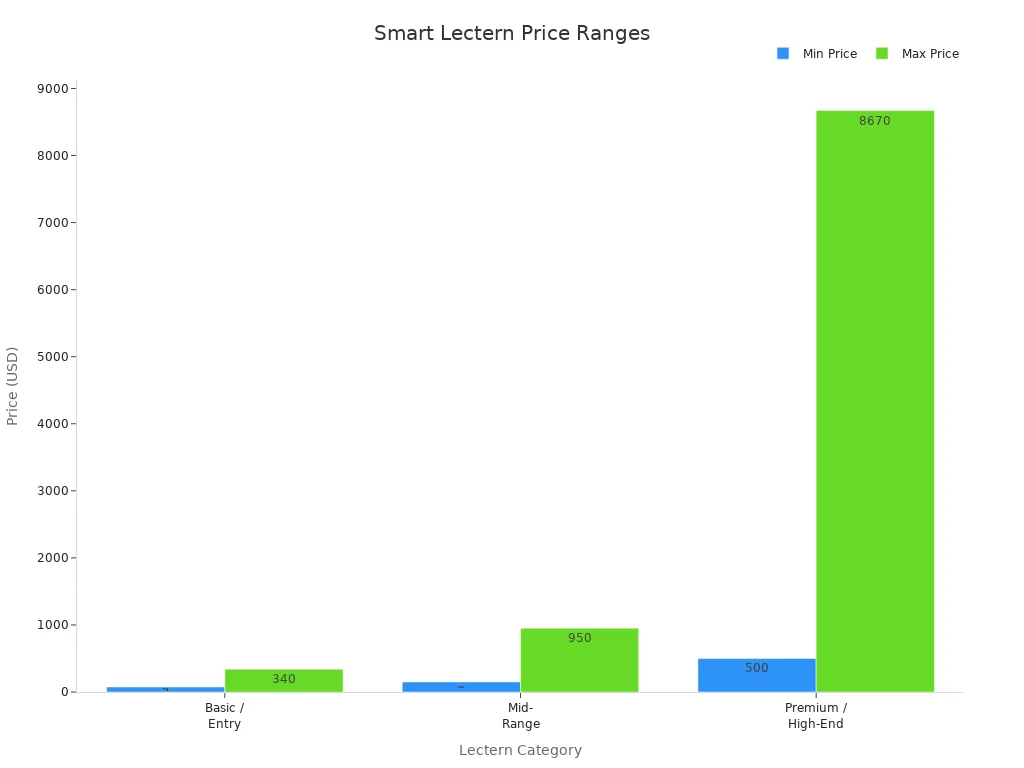
You do not need to spend a lot for a good lectern. Think about which features are most important to you. Sometimes, a mid-range lectern gives you the best deal. If you use your lectern every day, a premium model with more features and better materials may be worth it.
Note: Always match your budget to the features you need. The right smart lectern will be easy to move, strong, and a good price. It will help you for many years.
Final Choice
Balancing Needs
You have many options when you pick a smart lectern. The best choice balances your space, your events, and your technology needs. Start by making a list of your must-have features. Do you need a built-in microphone? Will you use a touchscreen? Think about your room size and how often you move the lectern.
Ask yourself these questions:
- Who will use the lectern most?
- What kind of events do you host?
- How much tech do you want built in?
- Do you need to move it often?
A good smart lectern should fit your daily routine. It should make your presentations easier, not harder. If you have a small space, pick a compact model. If you run big events, choose one with strong sound and display features. Always check if the lectern feels comfortable for you and your team.
Tip: Try out different models if you can. You will notice which one feels right for your space.
Future-Proofing
Technology changes fast. You want your smart lectern to keep up. When you plan for the future, you save money and avoid headaches later. Here are some ways to make sure your lectern stays useful:
- Look for models that let you upgrade parts, like screens or microphones.
- Choose a lectern that works with new software and devices.
- Pick a brand that offers regular updates and support.
- Make sure your team learns new tech skills. This helps everyone use new features with confidence.
- Build a strong tech setup in your room. This makes it easy to add things like AI or better connectivity later.
- Work with others in your organization to share ideas and solutions.
- Keep your lectern in good shape with regular checks and cleaning.
A future-ready smart lectern helps you share content, mark up documents, and connect with others easily. You can add new features as your needs grow. This keeps your space modern and ready for anything.
Choosing the right smart lectern means you match it to your room, event, and tech needs. You want a lectern that fits your space, matches your event style, and keeps speakers comfortable. Look for features like adjustable height, built-in tech, and a design that fits your brand. Here’s a quick checklist to help you decide:
- Does the style fit your event?
- Will you add a logo?
- Is it for indoors or outdoors?
- Do you need it to move easily?
- Can you adjust the height?
- Does it have the tech you need?
When you pick a smart lectern that is easy to use and can adapt, you get better presentations and happier speakers for years to come.